前段时间买了个树莓派 4B 回来做毕业设计,毕业答辩过了之后树莓派就闲置了下来。除了搭建一个局域网云盘以外,想着之前学过一段时间的 OpenCV,就买了个摄像头和人体传感器回来接在树莓派上面做了个简单的早安推送功能,可以每天早上在桌子前坐下的时候微信推送一条早安问候还有天气预报。
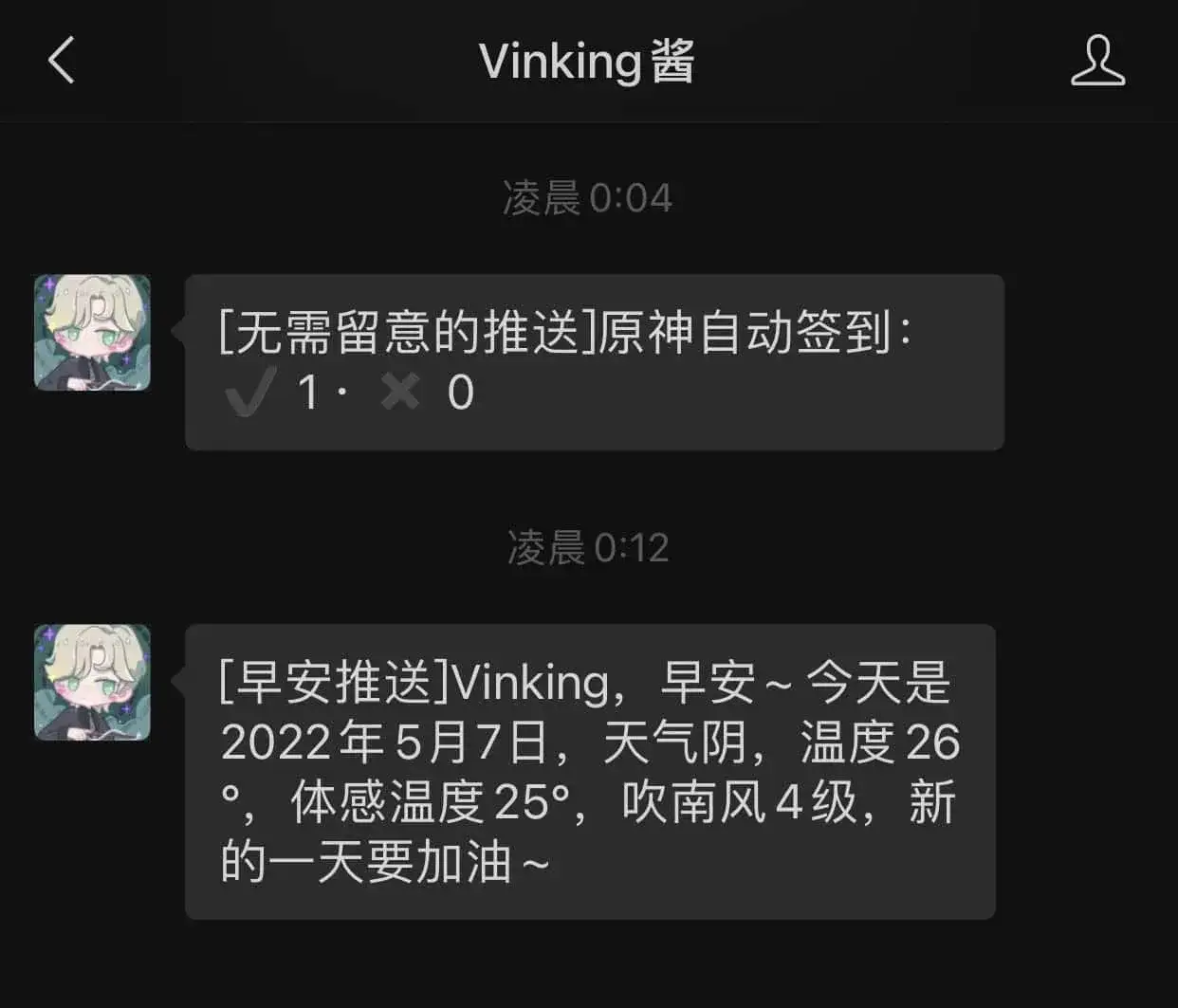
早安问候 & 天气预报
总体的设计思路是每天早上七点树莓派运行 py 脚本,通过人体传感器检测有没有人在桌子前,如果有人就打开摄像头去判断是不是本人,是本人就给微信推送消息。思路很简单,代码写下来也很顺利没有遇到什么大的问题,就只有接人体传感器的时候正负极不小心接反了烧坏了一个人体传感器 + 烫了一下手∠( ᐛ」∠)_
前期准备
🖥️ 一块安装好 OpenCV + Mediapipe 环境的树莓派
📹 一个摄像头
✋ 一个人体传感器(或者更多)
🔌 若干条母对母杜邦线
🎤 一个搭建了 Wecom 酱 的服务器(或者也可以在树莓派里面搭建,随意)
人体传感器
人体传感器淘宝上随便一个都可以,但是推荐买感应距离小一点的(大概 1 米左右),因为这里买的传感器是感应距离是 5 到 10 米,即使调到最小的感应距离,日常使用下来还是有一点点的太过灵敏了。
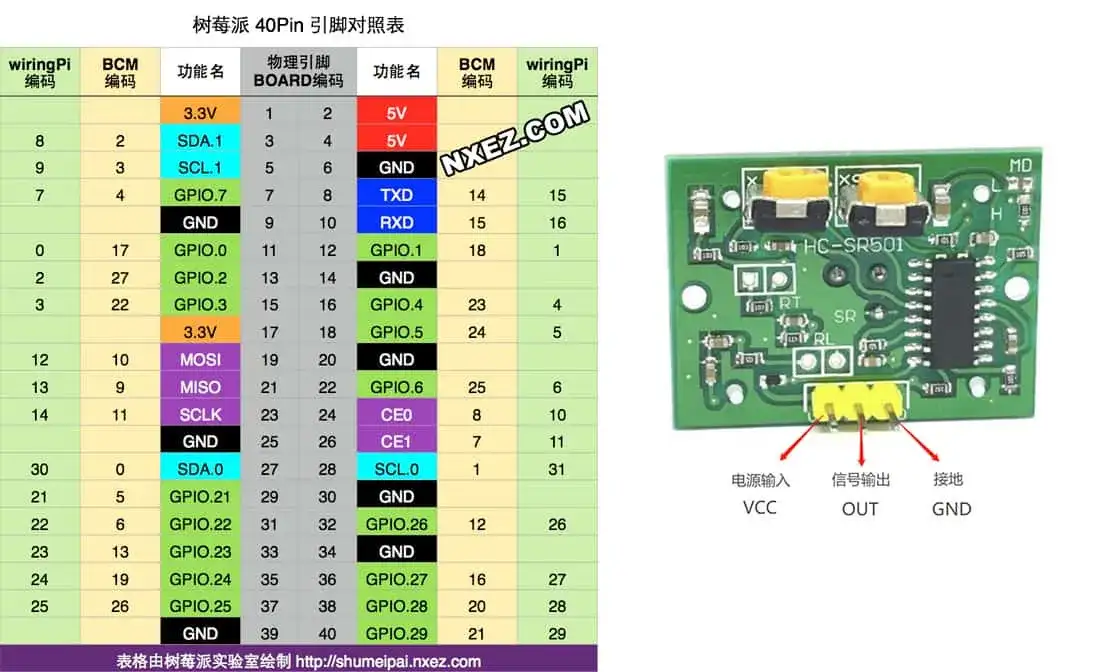
树莓派引脚图 & 人体传感器引脚
人体传感器的 VCC 引脚接树莓派的 4 号 5V 引脚、GND 引脚接树莓派的 6 号 GND 引脚、至于 OUT 引脚可以接在树莓派的任何 GPIO 引脚,这里选择接在 38 号的 GPIO.28 引脚。
Note注意不要把 VCC 和 GND 给接反了,否则直接烧坏传感器。VCC 引脚接树莓派 3.3V 引脚还是 5V 引脚看传感器的工作电压。
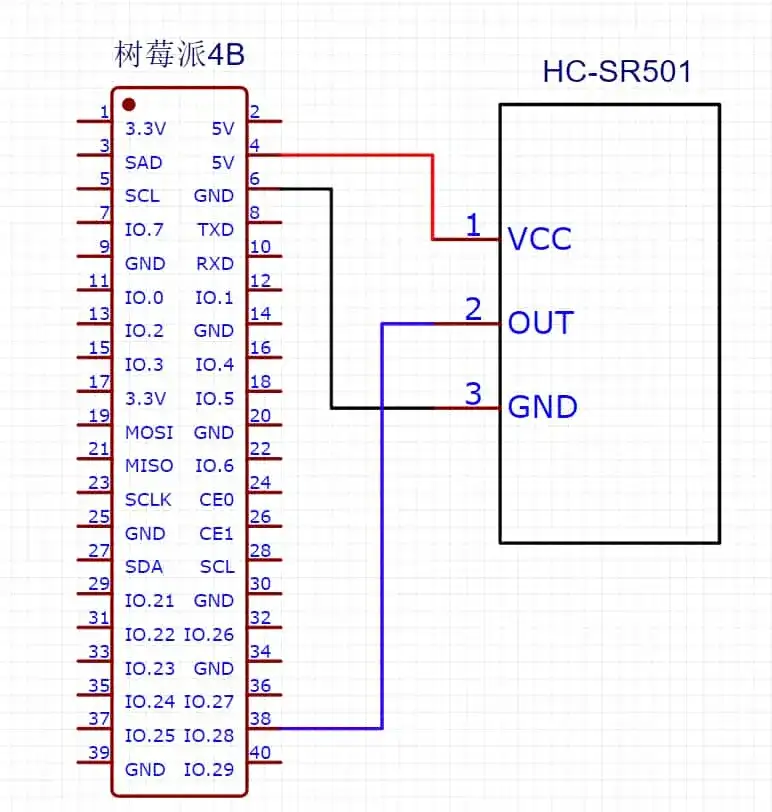
传感器接线
接着把下面代码扔进树莓派里面运行一下:
CodeBlock Loading...
如果一切顺利,当把手放到人体传感器前面的时候会输出 HIGH,而且会 HIGH 一段时间(传感器设置了延时),没有检测到的话就输出 LOW。这样的话第一步调试人体传感器的工作就完成了。

人体传感器输出
人脸识别的前期准备
人脸识别方面采用 OpenCV + Mediapipe 抓取摄像的人脸图像,再把抓取到的人脸通过 API 上传到旷视的 Face++ 平台 进行人脸识别得到结果。
Face++ 人脸检测
首先准备一张自拍的照片用来做数据库的人脸,通过 multipart/form-data 方法 POST 调用 人脸检测 API 得到 facetoken。facetoken 代表这张图片的每个检测出来的人脸,具有唯一性,后续可以用来进行人脸对比。
CodeBlock Loading...
拿到 facetoken 之后,由于我们并没有将其存放在 faceset 中,72 小时之后会自动失效。所以下一步需要创建一个人脸库用来存放 facetoken 以便长期使用。
Face++ 创建人脸库
通过 POST 方法调用创建 人脸库 API 即可创建人脸库。
CodeBlock Loading...
得到 faceset_token 后就可以向人脸库添加人脸了。
Face++ 添加人脸
同样的,向人脸库添加人脸同样非常简单,与上面的步骤无异。
CodeBlock Loading...
至此人脸识别的前期准备就已经完成, Face++ 的文档中心 有各种 API 更详细的介绍,具体的使用方法可以点进去看看。
主程序
在获取天气方面,这里使用的是 和风天气的实时天气 API。通过向 https://devapi.qweather.com/v7/weather/now?location={城市 ID}&key={key} 发送 GET 请求获取天气状况。人脸比对通过调用 人脸比对 API 实现,因为同样需要上传文件,所以还是使用 multipart/form-data 方法 POST 调用 API。完整的程序如下:
CodeBlock Loading...
要想每天七点定时执行,只需要输入 crontab -e 命令,在文件里面输入 0 7 * * * python3 {文件路径} 然后 Ctrl + O 保存,Ctrl + X 退出即可。
最后
一直以来都想要一整套智能家居,但是价格有一点点贵,所以只能自己换个方式来实现类似功能了,而且当功能成功跑起来的时候还是非常有成就感的,或许也是一种直接买回来体验不到的快乐吧。
Ps. 如果想同时控制智能家居(例如小米智能插座)开启关闭的话,这里找到一个 小米智能设备的 python 库 ,或许可以实现类似功能。