Intro
Follow-up
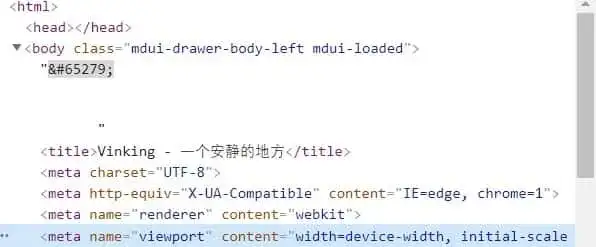
After redeploying the site yesterday, I noticed a wide gap between the top of the page and the browser frame. At first I thought it was a CSS issue, but when I opened the console I found that a strange  had appeared inside the <body> tag, and everything that belonged in <head> had ended up in <body>.

Anomaly
A Baidu search revealed that the culprit was my rush to edit PHP files with Windows’ built-in Notepad, which saves in UTF-8 with BOM. That BOM header is written right at the top of the PHP file, and PHP outputs any characters outside <?php ?> by default, so the page gains an extra . UTF-8 with BOM also causes the browser to parse <head> content as part of <body>.
To get rid of  you simply need to re-save the file in UTF-8 without BOM.
Following the “solve PHP problems with PHP” principle, I dug up this
which contains a snippet of PHP. Drop it in the root directory, visit it once, and it strips the BOM from every file. If you have lots of files it can take a while, so I added a file-type check to touch only PHP files. Here’s the updated code.
<?php
header('Content-Type: text/html; charset=utf-8');
$directory = isset($_GET['dir']) ? $_GET['dir'] : '.';
$removeBom = isset($_GET['remove']) && $_GET['remove'] == 1;
echo 'Current directory: ' . htmlspecialchars($directory) . '. Mode: ';
echo $removeBom ? 'Detect BOM and remove it<br />' : 'Detect BOM only, no removal<br />';
scanDirectoryForBom($directory, $removeBom);
function scanDirectoryForBom($directory, $removeBom) {
if (!is_dir($directory)) {
echo 'Invalid directory: ' . htmlspecialchars($directory) . '<br />';
return;
}
if ($dh = opendir($directory)) {
while (($file = readdir($dh)) !== false) {
if ($file !== '.' && $file !== '..') {
$filePath = $directory . '/' . $file;
if (is_file($filePath) && pathinfo($filePath, PATHINFO_EXTENSION) === 'php') {
echo 'File: ' . htmlspecialchars($filePath) . checkAndHandleBom($filePath, $removeBom) . '<br />';
} elseif (is_dir($filePath)) {
scanDirectoryForBom($filePath, $removeBom);
}
}
}
closedir($dh);
} else {
echo 'Cannot open directory: ' . htmlspecialchars($directory) . '<br />';
}
}
function checkAndHandleBom($filePath, $removeBom) {
$contents = @file_get_contents($filePath);
if ($contents === false) {
return ' <font color="red">Unable to read file</font>';
}
$bom = "\xEF\xBB\xBF";
if (substr($contents, 0, 3) === $bom) {
if ($removeBom) {
$newContents = substr($contents, 3);
if (rewriteFile($filePath, $newContents)) {
return ' <font color="green">BOM found and removed</font>';
} else {
return ' <font color="red">BOM found but removal failed</font>';
}
} else {
return ' <font color="red">BOM found</font>';
}
} else {
return ' No BOM found';
}
}
function rewriteFile($filePath, $data) {
if (file_put_contents($filePath, $data, LOCK_EX) === false) {
return false;
}
return true;
}
?>
How to avoid it? Don’t use the lousy Notepad to edit PHP files, or you’ll end up wasting a whole night like me o(TヘTo)