Note😫 本文不适合懒得折腾的同学
本文章涉及对主题代码的更改,会导致每次升级主题后都需要重新按照下面的修改方式修改一遍,否则会没有效果。所以如你所见,我的主题版本还停留在 20230131 版本。
📦 请务必做好备份
在自己操作前请备份好主题文件以及数据库文件,避免操作失误而不知道怎么恢复到原来的状态。
🍦 对小白友好
本文章面向代码小白,将会比较详细地介绍整个思考流程,如果你有一定代码水平,可以直接跳过文章的流程部分直接查看代码。
目前我的博客首页有普通文章和『说一下』这两种不同的东西。『说一下』可以很好地处理一些日常吐槽或者没有必要 懒得 写成文章的事情。接下来会以 Cuteen 主题为例,让你能够给自己的主题加上属于自己的『说一下』。
你刚完成了一篇简短文章,但是文章的长度还有类型都似乎和你以前写过的文章不一样,这篇文章与其叫文章,更像是朋友圈或者空间的说说。所以你想给博客的首页新增加一种类型,用来显示这种别具一格的文章。你理了理思路,知道要做的只有两件事情,就是怎么让 Typecho 能够知道刚完成的这篇文章究竟是什么? 还有 怎样根据文章的类型去渲染不同的样子?。那就开始吧。
让 Typecho 能够知道刚完成的这篇文章究竟是什么
刚好 Typecho 提供了这一功能,它叫自定义字段。
自定义字段
在 Typecho 中,自定义字段是官方为用户自定义留下的一个接口。通过在文章编写页面选择/填写对应的信息,可以使得 Typecho 能够根据这些信息来决定怎样去处理这篇文章的某些东西。

文章自定义字段
你觉得这东西简直就是为了你上面的想法量身定做的功能,只需要在发表文章的时候选择是文章还是说说不就可以让 Typecho 知道以什么样的风格来渲染了吗。
经过在主题文件夹的一轮寻找,你终于在 core 文件夹下的 Fields.php 找到了 themeFields 函数,这个函数可以给文章添加自定义字段。
Note🔔 请注意:不同主题添加自定义字段文件的位置还有名字都可能不一样,例如 Sunny 主题的
themeFields函数在functions.php文件的第 1292 行。这个文件叫什么在哪里可以询问主题的作者。当然你也像我当初一样根据后台文件编辑器下已有的自定义字段名字去主题文件夹 Ctrl + F 一个一个文件找。
你对函数做出了下面的修改:
CodeBlock Loading...
其中 Typecho_Widget_Helper_Form_Element_Select 类提供了创建下拉选择框的方法,这里创建一个名为 $isSpeak 的 下拉选择框表单字段,选项有 哒咩 和 是 两种,初始值为 0,即默认选中 哒咩,同时会在后台编辑器的自定义字段中显示该字段的名称为 是否是说说。
Note请注意:这里初始值建议选择为 0,即文章默认为普通文章。否则会将以前的文章全部变成了说说类型。
添加完之后重新进入后台编辑器能看到下面这个自定义字段:
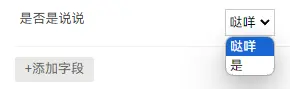
添加的自定义字段
到此,你给这篇文章选择了『是』这个选项。发表之后 Typecho 就知道你的这篇文章应该是一篇说说了。
怎样根据文章的类型去渲染不同的样子?
接下来你需要对首页代码进行修改,让它能根据刚才定义的字段来作出不同的渲染。你打开 index.php ,看见这样的一段代码:
CodeBlock Loading...
这是一段用于循环显示文章列表的代码,由此可知,调用 Context 类的 IndexList 方法会返回带有本次循环文章信息的结构。而这个 Context 类在 core 文件夹下的 Context.php 中。你需要修改这个 IndexList 函数,给它加上一个 if 来判断是不是说说类型的文章:
CodeBlock Loading...
其中 Context::ArticleExcerpt(1000 , $ctx) 是调用 Cuteen 主题的一个方法来限制在首页最多输出 1000 个字,防止过长而不美观,你可以按照自己的需求修改这个值。
Note请注意:非 Cuteen 主题这里需要将所有
$ctx->改成$this->。(因为 Cuteen 主题调用Context::IndexList($this)将$this作为实参传给了形参$ctx,所以在方法内需要使用$ctx->获取参数)。同样的非 Cuteen 主题是不能使用Context::ArticleExcerpt(1000 , $ctx)的,这里可以使用mb_substr($this->fields->excerpt, 0, 1000, 'UTF-8')输出文章前 1000 个字符。
找不到 while ($this->next()) 【以 Sunny 主题为例】
如果你的主题的 index.php 找不到 while ($this->next()) 的话,可以尝试打开 F12 定位到包裹文章的元素,这里是 <div class="postlist_out ">,然后在 index.php 里搜索这个 class 名字 postlist_out。如果找不到就继续找到这个元素的父元素,即 <main class="main_body">,再在 index.php 里搜索,以此类推。

定位
这里搜索 main_body 成功找到了输出文章列表的文件 article.php
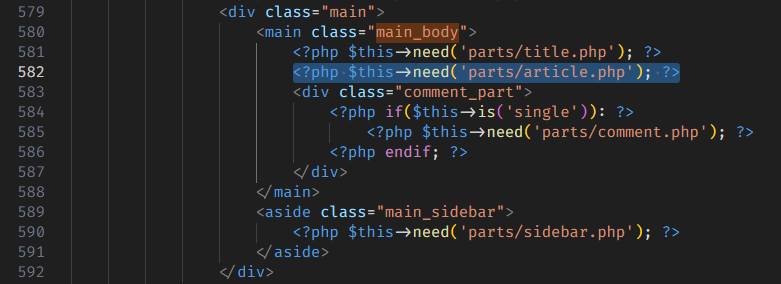
定位 article.php
然后进入 article.php,搜索 while ($this->next()),就可以找到文章结构了:
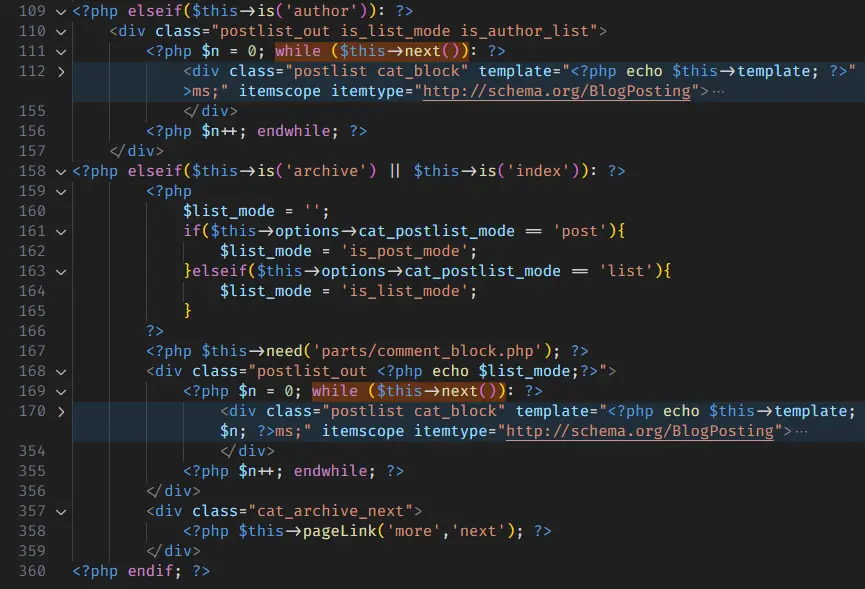
文章结构
保存之后你便获得一个属于你自己的『说一下』了。当然现在的『说一下』因为没有对应的 CSS,所以需要你自己来编写对应的 CSS 规则,这里就不展开了。