因为有时候需要在博客分享一些站外信息,为了让分享的卡片带有一些基本信息且可以具有实时性收集了一些 API,写文章的时候插入 [share url] [/share] 这个短代码实现自动解析的功能。只需要填入分享的网址不需要其他额外信息,非常方便。
游戏信息
Steam 游戏信息
对于 Steam 游戏的分享,最简单的方式就是用 iframe 标签调用官方提供的小组件:
但由于 Steam 处于半墙状态,这东西的加载速度实在是不敢恭维,甚至在某些地方的网络是直接摆烂加载不出来(例如我家😣),同理 Steam 游戏信息的 API https://store.steampowered.com/api/appdetails 受制于加载速度也是不太建议使用的。
小黑盒 API
这里推荐使用小黑盒的 API https://api.xiaoheihe.cn/game/web/get_game_detail 。
必要的参数是当前的时间戳 _time 以及 Steam 的游戏 ID appid。Just like this: https://api.xiaoheihe.cn/game/web/get_game_detail/?_time=1663404056&appid=289070。
如果请求的时候带上了 os_type=web&version=999.0.2 这两个参数的话就必须再带一个 hkey 参数,否则会提示 hkey 不能为空。网上并没有最新计算 hkey 的算法,再加上 hkey 的算法变动比较频繁,所以就不打算花时间去研究这个东西。目前来看小部分游戏似乎不带 hkey 参数是不会返回价格信息的,所以如果使用的话需要做好降级处理。
Steam API
Steam 的 API 必要的参数是游戏的 ID appids ,推荐带上查询游戏的地区 cc=cn ,这样返回的价格就是人民币(CNY);同时带上 l=schinese 参数,就会将标签、游戏简介之类的文本替换成中文文本(前提是发行商做了游戏页面的中文本地化)。
最后由于 Steam API 会返回非常非常非常多的信息,比小黑盒 API 数据量差不多大了一倍,让本就慢的加载速度雪上加霜。针对这种情况 Steam 提供了一个 filters 参数,允许用户指定并过滤出所需的信息,不过需要注意的是,这个参数只能过滤出对象集合(即被大括号{}或方括号[]包围的数据结构)。这意味着一旦使用 filters 参数进行过滤,所有非对象集合的数据,比如游戏名称 name,都将被排除在外。目前尚未发现解决这一限制的方法。用法 Just like this: https://store.steampowered.com/api/appdetails/?appids=814380&cc=cn&l=schinese 。
Note顺带一提,小黑盒的 API 返回的价格和折扣均是小黑盒的,并非是 Steam 的价格和折扣。
解析效果如下:
游戏对应平台链接
要想获取平台游戏对应的商店页面链接,就需要直接使用平台自带的 API 了(一般是平台的搜索 API)。
Steam
对于 Steam 平台,可以通过拼接 steam_appid 到基础 URL https://store.steampowered.com/app/ 来构造游戏链接。
例如,《胡闹厨房 2》的链接是 https://store.steampowered.com/app/728880。
Switch
Switch 平台的游戏搜索可通过 https://search.nintendo.jp/nintendo_soft/search.json API 实现,其中关键参数 q 代表游戏名称,支持英文或日文。如果直接使用中文名字,例如 q=集合啦!动物森友会 这样是获取不到游戏信息的。
例如《异度神剑 3》(Xenoblade 3)的 API URL 为: https://search.nintendo.jp/nintendo_soft/search.json?q=Xenoblade3 。通过 API 返回的 id 值,可以构造游戏在 Switch 商店的链接,如:https://store-jp.nintendo.com/list/software/70010000053335.html。
Ubisoft
Ubisoft 平台的游戏搜索 API 为 https://zh-cn.ubisoft.com/news2/search_name,需要 game_keyword 参数,支持中文游戏名搜索。
例如,搜索《碧海黑帆》的 API URL 为: https://zh-cn.ubisoft.com/news2/search_name?game_keyword=碧海黑帆。
将返回的 gameabb 值拼接到 https://zh-cn.ubisoft.com 后,即可得到游戏链接,如:https://zh-cn.ubisoft.com/skull_and_bones。
Blizzard
Warning💩 搜索不准确警告
Blizzard 平台的搜索可能会出现不准确的结果。
Blizzard 平台的游戏搜索 API 是 https://tw.shop.battle.net/api/search,需要 q(游戏名)和 l(语言代码,如 en-us 或 zh-tw)两个参数。
例如,搜索《魔兽争霸 3:重制版》的 API URL 为:https://tw.shop.battle.net/api/search?q=Warcraft III: Reforged&l=en-us 。得到返回数据中的 destination 后,拼接到 https://tw.shop.battle.net/zh-tw 基础 URL,即可构造游戏链接,如:https://tw.shop.battle.net/zh-tw/product/warcraft-iii-reforged。
其他平台
对于 Playstation、Xbox、iOS 等平台,目前没有找到直接的 API,通常采用爬虫获取游戏链接。
至于 Epic 因采用加密参数和反爬虫策略,而 Origin 平台缺少公开 API,因此这些平台会直接使用小黑盒提供的游戏链接。
Bilibili 信息
视频
与 Steam 游戏卡片分享类似,Bilibili 也可以通过 iframe 标签分享视频信息:

Bilbili 分享
Bilibili 视频信息的 API 调用相对简单,仅需一个表示视频的 BV 号或 AV 号的参数 bvid 或 aid。例如:https://api.bilibili.com/x/web-interface/view?bvid=1NT411u7n9。
解析效果如下:
动态
Bilibili 动态信息的 API 同样简单,需要一个表示动态的参数 id,以及一个可选的时区偏移量 timezone_offset(以分钟计,默认值为 -480)。例如:https://api.bilibili.com/x/polymer/web-dynamic/v1/detail?id=706453546894098487。
Note动态内容的数组
rich_text_nodes会以表情包作为数组的分隔符。例如,句子「这是一条文字捏[给心心]更多的文字」在数组中将分为三个元素:这是一条文字捏、[给心心]、更多的文字。因此,需要遍历数组并拼接元素以获取完整的动态内容。
弹幕
弹幕信息的 API 需要一个表示视频的 oid 参数,即视频的 cid ,可通过视频信息 API 获取。例如,获取 cid 为 834814323 的视频弹幕:https://api.bilibili.com/x/v1/dm/list.so?oid=834814323 。API 返回的数据格式为 XML。
Note
1.视频的
cid与视频的 AV/BV 号不是同一个概念,例如 BV 号为 1NT411u7n9 的视频,对应的cid为 834814323。
- 返回的数据经过 deflate 压缩,需要解压处理。在 PHP 中可以使用
gzinflate()函数进行解压。
重点关注以下数据:
<maxlimit>标签包含视频最大的弹幕数量。<state>标签表示视频弹幕是否开放,0表示可以正常发弹幕,1表示关闭弹幕发送功能。<d p="114.63900,1,25,16777215,1673445087,0,xxxxxxxx,yyyyyyyyyyyyyyyyyyy,10"> 压力终于给到了二创</d>标签包含每一条弹幕的具体信息,详细信息可参考:bilibili-API-collect 属性 p 。据此可以得出,内容为压力终于给到了二创的弹幕在视频第 114.639 秒出现,是一条普通从右向左滚动的弹幕,字号为标准,字体颜色为白色,在 2023 年 1 月 11 日 21 点 51 分 27 秒发送(时间戳为 1673445087),弹幕池类型为普通弹幕,发送者 mid 的 HASH 为一个 8 位数字字母组合 xxxxxxxx,弹幕 dmid 为一个 19 位纯数字 yyyyyyyyyyyyyyyyyyy,当弹幕屏蔽等级大于 10 时可以屏蔽该弹幕。
Github 仓库信息
同样 Github 仓库信息的 API 也很简单,只需要 https://api.github.com/repos/ 后面接上 {用户名}/{仓库名} 即可。Like this: https://api.github.com/repos/SocialSisterYi/bilibili-API-collect 。
解析效果如下:
博客文章/页面信息
因为 Typecho 升级到了最新的 1.2 版本后原来输出文章信息的插件用不了,所以只能自己上手加一点功能了。
在 Function.php 中加上:
CodeBlock Loading...
然后新建一个独立页面模板,通过获取网址的参数来调用 getCustom() 。
CodeBlock Loading...
最后后台增加一个独立页面,模板选文章信息即可。只有一个对应文章 cid 或者页面 slug 的参数 uid ,文章调用如下:https://vinking.top/getInfo.html?uid=67 ,独立页面调用如下:https://vinking.top/getInfo.html?uid=about 。
文章解析效果如下:
目前就使用了这几个最常用的 API,更多的站外解析就等到有需要的时候再写吧🙈。
普通网址解析
最近写了个 API 可以解析普通页面,不过有些网址会出现解析不成功的情况,先凑合着用吧...
2022.12.3:经过优化之后已经大幅提高对不同网站的兼容性。
Title 和 Description 都解析成功
网址 Title 解析失败
以《原神》官方网站为例,从下图中可以观察到,该页面的 title 标签内容是通过名为 config.54af175465c7448a0fa377d065a2d6da.js 的 js 文件动态生成的,这意味着在页面完全加载完成之前,原始的静态 HTML 中并不包含 <title> 标签,因此无法直接获取到页面标题。
然而,该页面定义了 keywords 元数据,所以在无法获取 <title> 标签的情况下,我们会选择 keywords 中的第一个值作为解析后的标题。这样做的原因是 keywords 中的第一个值通常与页面标题相符,同时在没有其他明显代表网页标题的信息时,这是一个可行的替代方案。
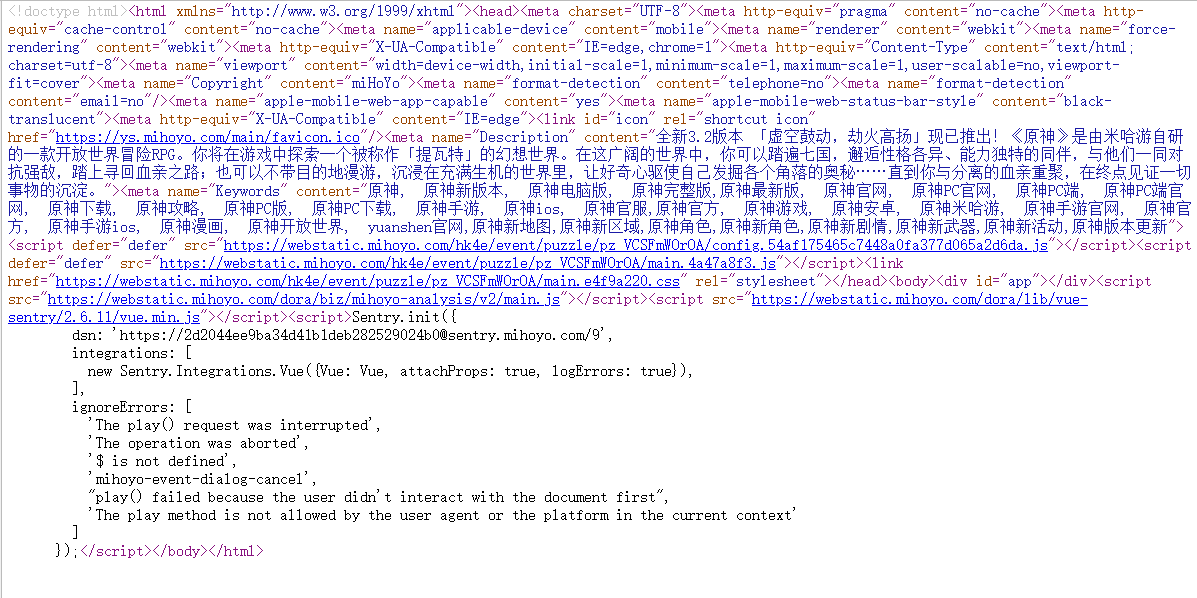
Title 解析失败的例子
网址 Description 解析失败
网址不存在
网址境内访问超时
网址境内访问超时的时候自动使用代理再次尝试,再次访问超时则降级成『网址不存在』处理